Monday, 26 May 2014

Week 2: 2 Steps Forward, 1 Step Back


Week 2 of Red Sun Development has begun, and already I've made a mess of things. All of the notes and information for this week's update got lost when some re-organizing happened. We're working mostly from memory folks so bear with me.

I'm going to start of with the programming side of things this week. The big news here is that we've been trying to decide whether or not to use a regular physics based character controller or build on ourselves that doesn't get caught up with the limitations of Unity's engine. The upside is that Unity has a pretty nice physics engine but forces you into a few things that can give you problems, especially when you tie it into animation. So we're going to stick with the homebrew controller that doesn't stick to Unity's physics engine. It's going to mean a bit more work in some areas but based on what the programmers have told us, a lot less work in others including fewer headaches for the team as a whole.

Additionally in the world of code, our camera has been working wonderfully. We're getting some added features there including camera panning to see more of the level and zooming in/out. Some of the major design considerations here include what we want the player to actually see when moving the camera around. Since we're focusing on the puzzle element of the platformer genre the goal is let people see what they're up against almost as much as possible. This usually means that the restraints we're likely going to put on it include preventing them from zooming too far out and preventing them from seeing the next room or level. That could really pose some problems. Players aren't meant to see the man behind the curtain.

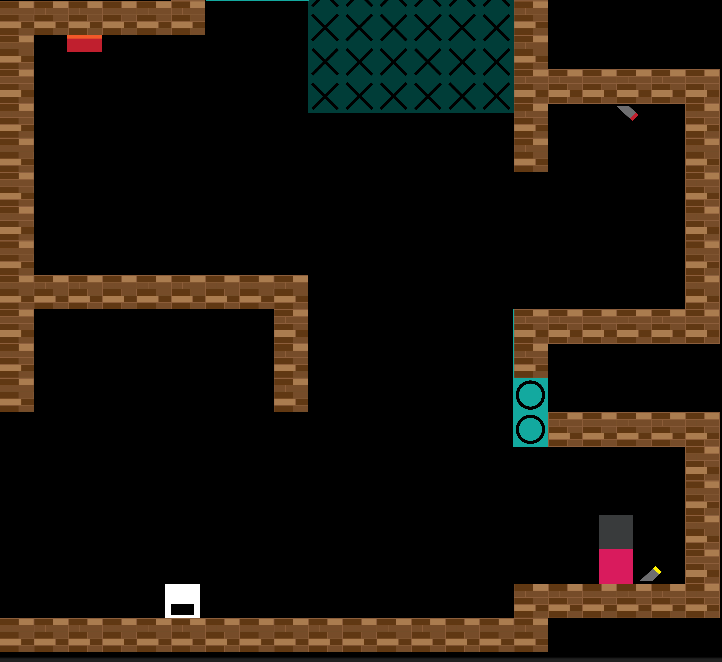
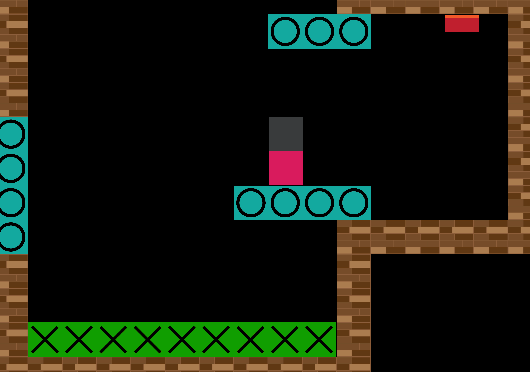
Speaking of cameras and zooming. We've also started work on the parallax backgrounds. Unity has some pretty sweet built in stuff so it makes things incredibly easy for us. There's a little bit of tweaking to do but for the most part we're working actually constructing the backgrounds. This means lots of drawings of scenery and buildings. It also means that it's coming up on time to actually skin the levels. I don't mean taking the skin off of the levels as you might an animal but just the opposite. We have to put all of the tiles and art into the level. As you saw last week it's just a bunch of small boxes with Xs and Os on them to tell us what they mean. In the future you'll see lots of pretty walls, spikes, and various other hazards. We'll just have to deal with the jarring images for now since the tile sets aren't quite ready.

Moving along, just as Bo can now do, we've got Bo running around fully animated now! It's a pretty big step to have the basic animations nearly completed. They don't look quite right just yet but no one really expected them to look perfect from the get-go. We've got a fair bit of tweaking to do and one more large problem that is rearing it's ugly head. Currently we have agreed on a fairly low framerate for the animations. We don't need a 60 fps game. That said the animations are looking a bit staccato with the current setup so we might have to generate some more frames. This isn't necessarily as easy as just pulling the arms in here or there but might require a fair bit more work. Unfortunately we don't have our animator for the entire summer, but we're confident she's up to the challenge.

Lastly we've got a bit more concept art and the tutorial level is starting to take shape. Things are coming along quite nicely even though we're still quite early in the cycle, so lets keep this ball rolling and return to you guys next week.

Thursday, 15 May 2014

Week 1: And They're Off!


Hello everybody! Welcome to week 1 of production for Red Sun. I expect that everyone here already knows what's going on but for those of you who don't here's the summary. Red Sun is a capstone project being built by students of Sheridan College here in the great white north, a.k.a. Canada.

We're now a week into the trenches and it's time we took a look at what's already been done and what we have to look forward to.

Starting with the art team. First up is animation. Our resident animator has been working hard at getting Bo's walk/run cycle to look right. This stuff isn't easy as much of the smaller details can really throw off the way it looks but it's going strong and we're well on our way to a very nice looking shepherd. Looking forward there are some concerns about getting other animation sequences just right since it's really hard to turn our wolves into something that has the right feel.


Next up, non-animated art assets. There's a ton of concept art going around the group right now, and you can see why some of it might be hard to translate into real game art. Some of it was done before we got this far in since a whole bunch of pre-production happened during the school semester. These pieces are some of the few things that are getting carried forward. Some of these pieces are really wonderful and some are still getting worked on. We recently saw the Huntsman finished but he's not read for here yet. You'll see plenty of him in the near future.

Also in the art department, we've got some of the background art getting started. Hopefully by next week we'll have some menu backgrounds and maybe, no promises though, some level backgrounds to share with you. Parallax backgrounds can sometimes cause weird issues, especially in 2D games. Since it isn't actually 3D and we're trying to simulate what they would look like in a real 3D environment we have to cheat a little bit. Unfortunately this can cause problems in some cases so it will take a bit of work to get things looking right. Also a concern is Bo's primary movement in the game is upwards and downwards. If you're not familiar with the game, it's going to be a dream-like city-scape. She'll be travelling up and down buildings which stops us from tiling the background the way you could in a side-to-side forest or hill environment.

Music. This isn't something that we are really going to have much of until significantly later in the project. Sensing a theme here? Early on in the development there's a lot of stuff for the programmers to do and the artists are really just getting things rolling so they can get more fancy things and add touch ups to existing assets. That's not to say they aren't working hard, but the fancy stuff that we get to show off comes much later. That said, music falls under the same category. We've had some trouble getting musicians so far. Initially there were two of them that were going to be working with us but they aren't anymore. They got better, and in some cases paying, opportunities. Hopefully we can find someone (or someones) to take their place. If we're really lucky we might have some help finding sound techs through the school.

Now we get to move onto the meaty stuff. The programmers have been very hard at work so far getting a working environment for us. We're using unity, which makes things easier for the designers, and already have a level that can be played through. No framework outside of it but it's an art-less level that has all the things we want in it so far. It's got elevators, switches, buttons, sheep, doors, and a fair bit of death. Working hazards in the level this early really helps get this thing off the ground. We haven't put this into the context of the rest of the game yet but there is concern it might be a bit too easy and that we might have to go back and change things, but that's a process for later in the development cycle and I know I can't wait to test it myself.

Behind the scenes the programmers have also been working on the Wolf AI, more room components, and some basic game infrastructure. You can expect some neat things like gears, conveyor belts, and wolves in the future. Nothing ready to show there yet but from the things I've seen it's looking pretty sweet for it being this early. I expect the momentum to carry on into the summer months.

Things are off to a great start. Sometimes I find it hard to make work for myself but the rest of the team is very hard at work making sure that things are working and look pretty.

Monday, 5 May 2014

Production

The past two weeks have been a break between semesters for the team. There has been brainstorming, concept art, and new team members. This week the primary focus is on scheduling and bringing everyone up to speed on Unity 4.3.4, the version we will be making the game in. While it would be ideal to wait for Unity 5, it looks like it will be coming out too late for us.

The most recent Unity tutorials on making 2D games have been excellent. They are short and to the point. This allows each member of the team to check that their portion of the project, or whatever they happen to be working on at the time, is working correctly. Yay for Unity tutorials.

The final additions to the team bring the head count up to six working full time through the summer. Two designers, two programmers, one animator, and one project manager.

Monday, 14 April 2014

Prototype Programming

Hello everyone, this is Colin, one of the programmers on Red Sun. So far in the project I have worked on the foundation work of the prototype, by which I mean the movement of the character as well as the buttons, switches, and the various objects they affect. My main focus when creating these objects was to make using them as designer-friendly as possible. With that in mind I have also made a few simple tools and editor scripts that should make it a little easier to create and design levels for this game. Creating and refining these kinds of features and scripts will likely be my primary task over the next couple of weeks while we get all of the groundwork done. After that, we'll be moving on to bigger things like enemy AI and level streaming, and In the meantime I'll try to keep this blog updated on how things are going on my side of the project.

Friday, 11 April 2014

Working on Camera

Hello, I'm John, one of the programmers in this project, where I was asked to do the camera work for the prototype. The prototype that the programmers have made so far is a simple, closed room with simple boxes and circles, also known as programmer art.

When it comes to the prototype, I have created two camera modes so far: 

Multi-target camera mode

In this mode, one needs to track all of the interesting objects in the level, which includes Bo, the sheep, the wolves, and others that we may see fit. Of course, while in this camera mode, all of these objects must be within the camera's field of view, especially Bo. It is really bad camera work if you cannot see who you control, right? So we set a maximum threshold for our characters' positions relative to the camera before we zoom in or out.

However, zooming opens another cam of worms to deal with, such as:
  •  objects being so far apart that the player is too small in size to view, or 
  • the objects are too near between each other that the overall actual puzzle room cannot be seen, so the player cannot really see what's going on with the puzzle room once they do things such as pulling levers, stepping on buttons, etc. 
In order to solve this, we did three things. First, we just created a minimum and maximum orthographic size variable for our camera. This prevents the camera from zooming in or out too much. The minimum orthographic size of the camera is set such that a majority of the current level is within the camera's field of view. Meanwhile, the maximum orthographic size is set to a value where the entire room can be seen, and consumes most of the camera's field of view. When setting these values, it is important to note that these values should not be too far apart so that the zooming events do not make the player dizzy when the player's position satisfies the criteria for zooming in and zooming out.

Second, we added weights for every interesting object in the game to establish focus to those that are more important.For example, the player must have higher weight than sheep and wolves. These wights are important when calculated the weighted average of all the positions that will determine the camera's position while in this camera mode.

Finally, we created an empty GameObject that is located at the centre of the room, with its weight set higher than the rest of the objects in the level. This allows the player to see most of the puzzle room, while still having focus towards the interesting objects (Bo, sheep, wolves, etc.) 


Reveal camera mode

As of this stage of the development, we have agreed that we will introduce another camera mode whenever an object appears in the game for the first time. For example, in out prototype, I assumed that the new object being introduced at the current level we are working on is a button.

When the player touches the ground for the first time in the level, we immediately switch to this new camera mode to "reveal" the new item. So, the camera "lerps" (basically interpolates) from the current position of the camera on the way to the location of the new interesting object to be revealed. Then we stop the camera movement once it has reached its intended position to "reveal" the new item. Then, we switch back to the multi-target camera mode to resume gameplay.

Currently, the camera's position "jumps back" from the newly-revealed item in the level to the weighted centre of all of the tracked objects in the level. However, I'm also considering to "lerp" the camera back to its original position (i.e. its position prior to the switch to the "reveal" camera mode.)

I am also considering other ways to put the "reveal" camera to use. For example, when a switch has been triggered, the camera will "lerp" towards the object affected by the triggered switch, and goes back to the player a few seconds once it has finished the consequent action. However, repeatedly triggering the switch on and off may get the player feeling dizzy due to having too much camera movement. So, if I introduce this action, I will do it on the initial interaction. Therefore, the subsequent interactions with the switch will not trigger this camera mode to avoid player dizziness and confusion.

Laying the GRIDwork (pun)

Hey gang, it's Nick (!) here, and I've been tasked to create a nice simple grid to help with the ease of creating puzzle rooms for Red Sun.

After brainstorming as to which base assets we would need to create a level, I set to work making some rudimentary avatars in Illustrator to represent the much prettier (eventually) real-game elements.


Using the Unity 2D platformer metrics, the team and I have come up with a simple jump metric for Bo that is a key step in creating a usable level creator grid.


It is important to note, however, that these metrics will most likely need to be constantly tweaked in order to achieve a result that we're happy with. 

The next step was to gather a consistent agreement on the dimensions of Bo and all other assets in order to create a simple and easily tile-able level creator. After deciding on a 1 unit by 1 unit grid, we went to work assigning height and with values to all the remaining assets we would be using.


The advantage of keeping relatively square, makes it much simpler to snap assets onto the grid when it comes time to make a bajillion puzzles.

So with our metrics figured out, I placed our nice little tiles in the grid to recreate the sample level used during our green light pitch. And let the play testing ensue!


Monday, 7 April 2014

Prototypes and Proposals

This week the team has been putting together the a prototype, level design document, and preliminary style guide. The prototype is getting its basic features from the programming side. Basic boxes and rudimentary controls will be the jumping off point for basic level design and ironing out the game play. The level design document is the design team getting diagrams around which we can all talk about. It takes time and effort to commit to a design and getting as much worked out on paper as possible will make the most of our time.  Finally the style guides are in much the same place as the other elements of the project. Its a great many ideas and concepts to work through so the team has a common place to start from. There is not enough production time to really change directions once key choices have been made and working out these ideas now well hopefully help prevent butting heads down the road when implementation gets underway.

Later this week the team will get putting together introductions and brief overviews of their work so far as individuals on the project.